
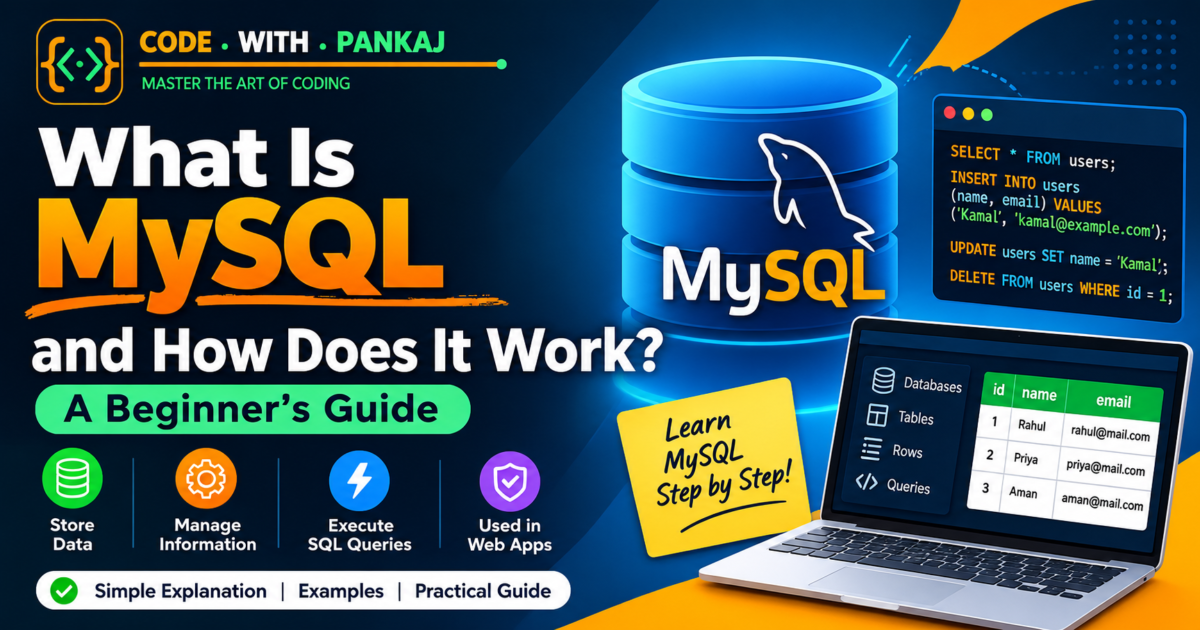
What Is MySQL and How Does It Work?
Have you ever wondered how websites store your name, email address, password, and other information?
For example, when you create an account on a website, your details need to be saved somewhere. When you log in again, the website checks your information.
This is where a database becomes useful.
MySQL is a popular database management system that helps websites and applications store, organize, and retrieve data.
In this beginner-friendly guide, you will learn what MySQL is, how it works, its main features, and how to use basic MySQL commands with simple examples.
You do not need any previous database knowledge to understand this article.
1. What Is MySQL?
MySQL is a relational database management system (RDBMS).
In simple English, MySQL is software that helps you store information in an organized way and access it whenever you need it.
Think of a database like an Excel workbook. You can store information in rows and columns, search for specific records, and update existing information.
MySQL does something similar, but it is designed to manage data for websites, applications, and other computer systems.
For example, an online shopping website may use MySQL to store:
- Customer names and email addresses
- Product names and prices
- Customer orders
- Payment records
- Delivery information
MySQL uses a language called SQL to work with data.
SQL stands for Structured Query Language. It allows you to add, read, update, and delete information in a database.
2. What Is a Database?
Before learning more about MySQL, let us understand what a database is.
A database is an organized collection of information that you can easily access, manage, and update.
Imagine that you run a school. You need to maintain student names, roll numbers, classes, and contact details.
You could store this information in a database table.
| Student ID | Student Name | Class |
|---|---|---|
| 101 | Rahul | 10th |
| 102 | Priya | 9th |
| 103 | Aman | 10th |
This table contains student information.
Each row represents one student, while each column represents a particular type of information.
MySQL allows you to create tables like this and manage thousands or even millions of records, depending on your system and database design.
3. How Does MySQL Work?
MySQL works by receiving instructions from a user or application, processing those instructions, and returning the requested results.
For example, imagine that a user logs in to your website.
The website sends a request to its backend. The backend communicates with MySQL to find the user’s account information. MySQL processes the request and returns the result.
The application then uses that result to continue the login process.
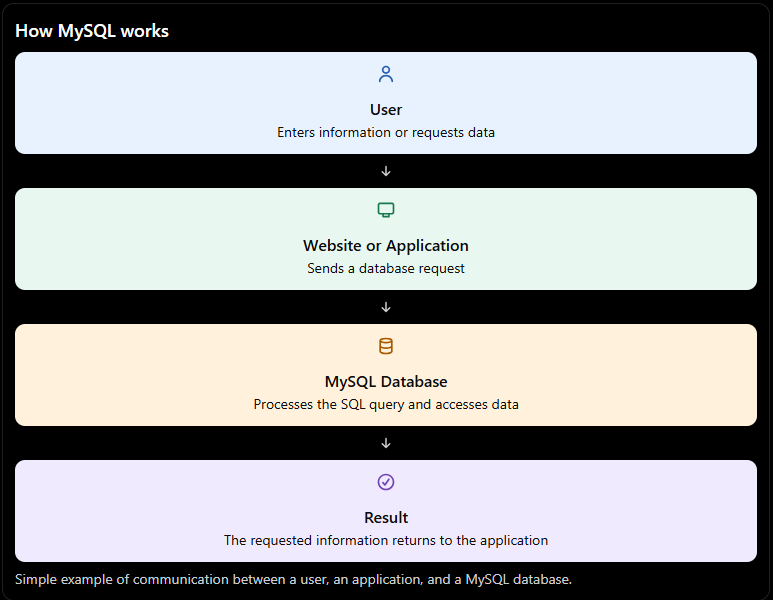
Let us understand the process step by step.
- A user performs an action, such as logging in or searching for a product.
- The website sends a request to its backend.
- The backend sends an SQL query to MySQL.
- MySQL processes the query and accesses the required data.
- MySQL returns the result to the application.
- The application displays the information to the user.
This process can happen very quickly.
Important: MySQL usually works with a backend application. HTML and CSS create the website’s appearance, JavaScript adds browser-side interactivity, and backend code communicates with the database.
4. What Is SQL in MySQL?
SQL stands for Structured Query Language.
It is the language used to communicate with relational databases such as MySQL.
You can use SQL to perform different operations on your data.
For example:
| SQL Command | Purpose |
|---|---|
SELECT | Read data |
INSERT | Add new data |
UPDATE | Change existing data |
DELETE | Remove data |
CREATE | Create a database object |
DROP | Remove a database object |
Here is a simple SQL example:
SELECT * FROM students;This query asks MySQL to display all columns and rows from the students table.
You do not need to learn every SQL command at once. Start with the basic commands and practise them using a small database.
5. What Are Tables, Rows, and Columns in MySQL?
MySQL stores relational data in tables.
A table is made up of rows and columns.
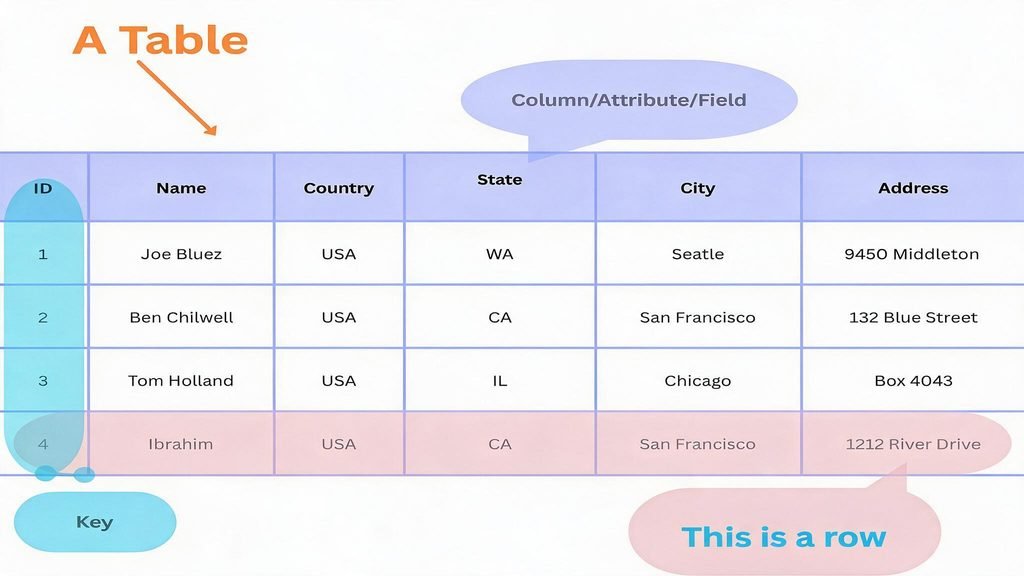
Let us use a student table as an example.
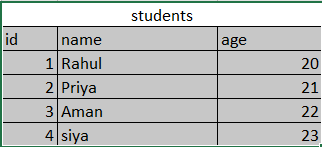
Here is what each part means:
- Table:
studentsis the name of the table. - Column:
id,name, andageare columns. - Row: Each student’s complete record is one row.
- Primary key: The
idcolumn can uniquely identify each student.
A primary key helps prevent two records from having the same identifier.
This structure makes information easier to organize and retrieve.
6. What Are the Main Features of MySQL?
MySQL provides several features that make it useful for websites and applications.
1. Easy data management
MySQL helps you add, update, delete, and search for information using SQL commands.
2. Relational database structure
You can organize information into related tables. For example, customer details can be stored separately from customer orders.
3. Security features
MySQL supports user accounts and permissions. You can control which users are allowed to access or modify particular databases.
4. Transaction support
With storage engines such as InnoDB, MySQL supports transactions. Transactions help group related database operations together.
5. Handles large amounts of data
MySQL can manage large databases when the application, queries, and database structure are designed appropriately.
6. Works with different programming languages
MySQL can be used with PHP, Python, Java, Node.js, C#, and many other technologies through suitable database connectors or drivers.
7. Backup and recovery options
MySQL provides tools and methods for backing up databases and restoring data when needed.
7. What Is MySQL Used For?
MySQL is used in many types of applications.
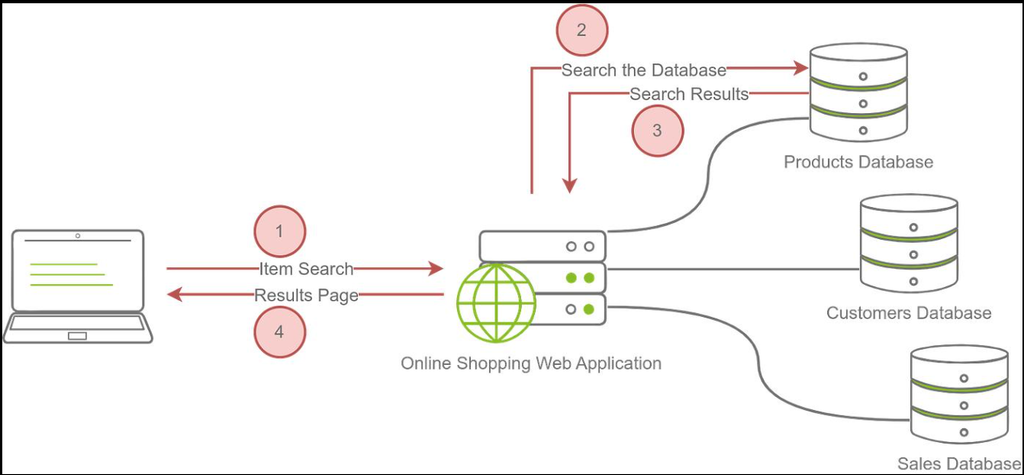
Here are some common examples.
Website development: MySQL stores user accounts, contact forms, blog posts, and other website content.
E-commerce websites: Online stores use databases to manage products, customers, orders, and inventory.
School management systems: Schools can store student records, attendance, fees, and examination results.
Blogging platforms: A blog can use MySQL to store articles, categories, comments, and user details.
Business applications: Companies can manage vendors, purchases, invoices, stock, and other business records.
Web applications: Applications use databases to save information that must remain available between user sessions.
For example, a PHP-based blog can use MySQL to save articles. When a visitor opens a blog post, PHP retrieves the article from MySQL and displays it on the website.
8. MySQL Example for Beginners
Now let us create a small database and add some information.
We will create a database named school_db and a table named students.
Step 1: Create a database
CREATE DATABASE school_db;This tells MySQL that you want to work with the school_db database.
Step 3: Create a table
CREATE TABLE students (
    id INT AUTO_INCREMENT PRIMARY KEY,
    name VARCHAR(100) NOT NULL,
    age INT
);
Let us understand this code.
CREATE TABLE studentscreates a table namedstudents.id INTcreates an integer column.AUTO_INCREMENTautomatically generates a new ID.PRIMARY KEYmakes the ID a unique identifier.name VARCHAR(100)stores text up to 100 characters.NOT NULLmeans the name cannot be empty.age INTstores an integer value for age.
Step 4: Insert data
INSERT INTO students (name, age)
VALUES ('Rahul', 20);
This command adds a new student named Rahul, aged 20.
Step 5: View the data
SELECT * FROM students;MySQL returns the records stored in the students table.
Your result will look similar to this:
| id | name | age |
|---|---|---|
| 1 | Rahul | 20 |
Congratulations! You have created a database, created a table, inserted data, and retrieved that data using MySQL.
9. How to Install and Use MySQL
If you want to practise MySQL on your computer, you can install MySQL Server and use a database tool to run SQL queries.
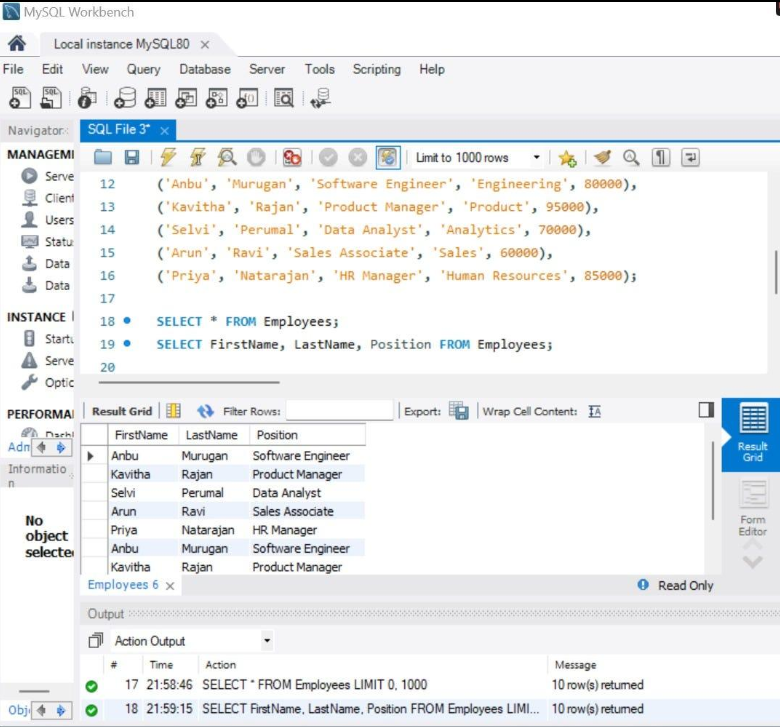
A simple way to get started is:
- Visit the official MySQL website.
- Download MySQL Community Server for your operating system.
- Follow the installation instructions.
- Set up your database user and password.
- Open a MySQL client or MySQL Workbench.
- Run the SQL commands from the previous section.
You can find the official resources here:
If you are learning PHP, you can also install XAMPP, which provides a local development environment with PHP and MariaDB. MariaDB is a separate database system with substantial compatibility with MySQL; it is not the same software as MySQL Server.
10. What Is the Difference Between MySQL and SQL?
Beginners often confuse SQL with MySQL, but they are different things.
| SQL | MySQL |
|---|---|
| SQL is a query language. | MySQL is a database management system. |
| It is used to communicate with databases. | It stores and manages data. |
It includes commands such as SELECT and INSERT. | It processes SQL commands to work with data. |
| It is used by several database systems. | It is one system that supports SQL. |
Think of SQL as the language you use to give instructions and MySQL as the software that processes those instructions.
11. What Is the Difference Between MySQL and Excel?
Both MySQL and Excel can organize information, but they are designed for different types of work.
| MySQL | Excel |
|---|---|
| Designed to manage databases. | Designed for spreadsheets and calculations. |
| Uses SQL queries to work with data. | Uses cells, formulas, filters, and functions. |
| Commonly used by websites and applications. | Commonly used for reports, analysis, and office work. |
| Supports multiple users and database permissions. | Supports collaboration, depending on the version and setup. |
| Can manage related tables and structured records. | Organizes information in worksheets and tables. |
For example, Excel is useful for preparing a monthly purchase report. MySQL can store purchase records for a business application that needs to search, update, and retrieve them regularly.
The two tools can also be used together. Data can be exported from a database into Excel for reporting and analysis.
12. Is MySQL Free to Use?
MySQL Community Edition is available as free, open-source software under the GNU General Public License (GPL).
It is commonly used for learning, development, and many production applications.
Oracle also offers commercial MySQL products and services. If you plan to use MySQL in a business environment, check the applicable license terms and product requirements.
13. Is MySQL Good for Beginners?
Yes, MySQL can be a suitable starting point for learning relational databases.
You can begin with simple commands and gradually learn how to create tables, connect tables, and retrieve information.
If you are interested in web development, learning MySQL alongside PHP is a practical way to understand how websites save and display information.
Start with these topics:
- Database creation
- Table creation
- Data types
- Primary keys
INSERT,SELECT,UPDATE, andDELETEWHEREconditions- Sorting and filtering
- Joins and relationships
- Database security and backups
Practise each topic with a small project rather than only reading about it.
14. Beginner MySQL Practice Project
Once you understand the basic commands, try building a simple Student Management System.
Your project can include:
- Add a new student
- View all students
- Search for a student
- Update student details
- Delete a student record
You can first build the database using MySQL. Later, connect it to PHP and create a simple interface using HTML, CSS, and Bootstrap.
This project will help you understand how a real application communicates with a database.
Frequently Asked Questions (FAQs)
1. What is MySQL in simple words?
MySQL is software that stores and manages data in an organized database. Websites and applications use it to save, find, and update information.
2. Is MySQL a programming language?
No. MySQL is a database management system. SQL is the language used to communicate with it.
3. Is MySQL easy to learn?
The basics are beginner-friendly. Start with creating databases, creating tables, and using simple SQL commands. More advanced topics take practice.
4. Can I use MySQL with PHP?
Yes. PHP can connect to MySQL using tools such as MySQLi and PDO. This combination is commonly used to build dynamic websites.
5. Is MySQL used for websites?
Yes. MySQL is used to store website information such as user accounts, blog posts, products, orders, and contact form submissions.
6. What is the difference between MySQL and a database?
A database is an organized collection of data. MySQL is software that creates, stores, manages, and retrieves data in databases.
7. Do I need to learn SQL before MySQL?
You can learn both together. Start by understanding basic SQL commands while practising them in MySQL.
Conclusion
MySQL is a widely used relational database management system that helps websites and applications store and manage information.
You have learned what MySQL is, how it works, how tables store data, and how to use basic SQL commands to create a database and retrieve information.
If you are new to coding, start small. Create a database, add a few records, and practise reading and updating them.
Once you understand the basics, you can connect MySQL with PHP and build your own dynamic website.
Keep learning, keep practising, and keep building with CodeWithPankaj!