
Have you ever wondered how websites save your information, process login forms, or show different content to different users?
Many websites use a programming language called PHP to perform these tasks.
If you are new to coding and want to learn web development, PHP is a useful language to understand. It helps you build dynamic websites, connect websites to databases, and create features such as login pages, contact forms, and admin panels.
The good news is that you do not need to be an experienced programmer to start learning PHP. You can begin with simple examples and improve your skills step by step.
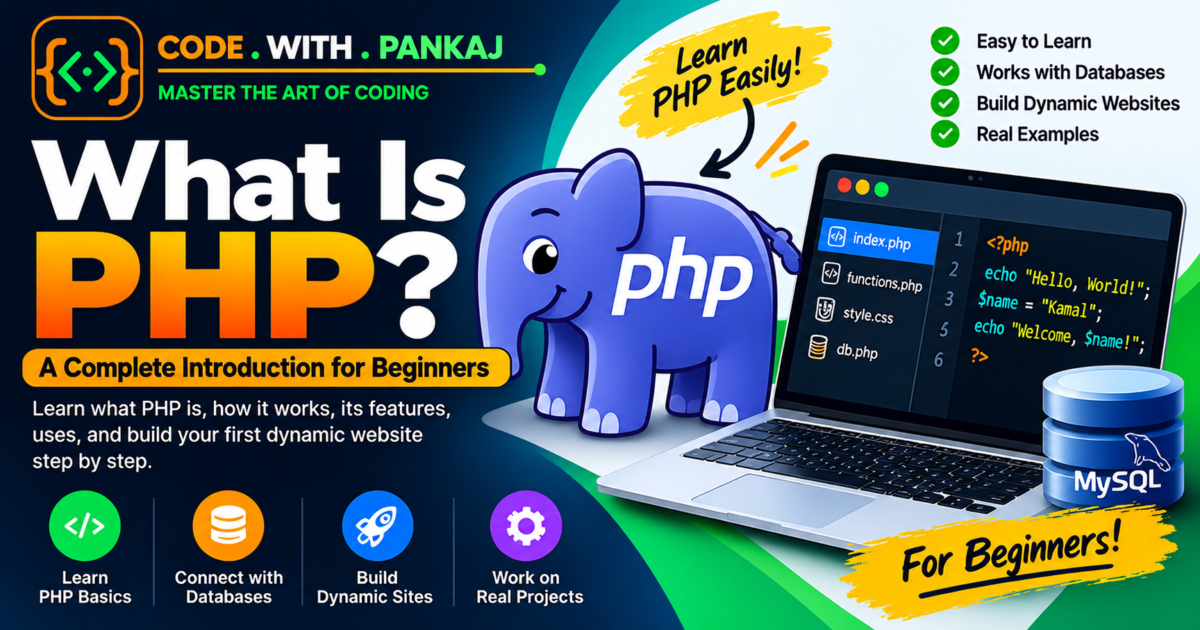
In this guide, you will learn what PHP is, how it works, its main features, and how you can use it to build your first website.
What Is PHP?
PHP is a server-side programming language mainly used to create dynamic websites and web applications.
The full form of PHP is PHP: Hypertext Preprocessor.
In simple words, PHP allows a website to perform tasks behind the scenes. For example, when you enter your username and password on a login page, PHP can check your details and decide whether to allow you to log in.
PHP can also work with databases to store and retrieve information.
For example, imagine you have a blog website. You want to publish articles, allow visitors to contact you, and manage your content through an admin panel. PHP can help you build all these features.
Here are some common things you can create using PHP:
- Dynamic websites
- Blog websites
- Login and registration systems
- Contact forms
- Admin dashboards
- Online shopping websites
- Database-driven applications
- Content management systems
PHP is commonly used with HTML, CSS, JavaScript, and databases such as MySQL.
What Does PHP Stand For?
PHP originally stood for Personal Home Page. Today, its official recursive name is PHP: Hypertext Preprocessor.
The word recursive means that the name refers to itself.
PHP was created by Rasmus Lerdorf in 1994. It started as a small set of tools for managing personal web pages and later developed into a widely used programming language for web development.
Today, developers use PHP to build websites and web applications of different sizes.
How Does PHP Work?
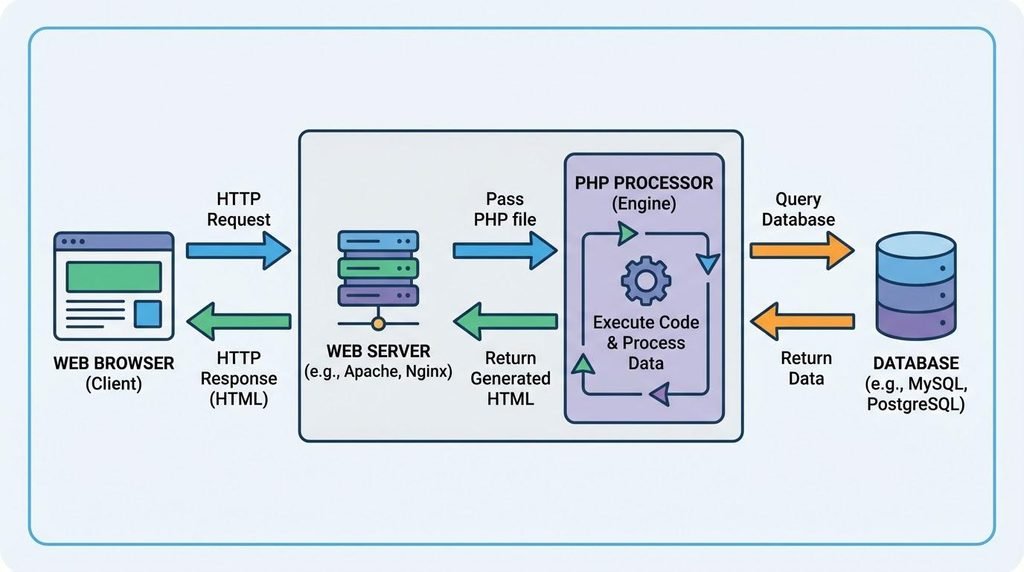
To understand PHP, you first need to know that a website can use two important parts:
- Client side: The part that runs in the visitor’s browser.
- Server side: The part that runs on a web server.
HTML, CSS, and JavaScript are commonly used on the client side. PHP usually runs on the server side.
When someone visits a PHP website, the following process takes place:
- The visitor opens a website in their browser.
- The browser sends a request to the web server.
- The server runs the PHP code.
- PHP may retrieve or save information in a database.
- The server sends the generated response back to the browser.
- The browser displays the website to the visitor.
For example, PHP can get the latest blog posts from a database and display them on a website.
Important: PHP code normally runs on the server. Visitors receive the generated output, such as HTML, rather than the original PHP source code.
What Is the Difference Between a Static and Dynamic Website?
Before learning PHP, it is helpful to understand static and dynamic websites.
| Static Website | Dynamic Website |
|---|---|
| Content is usually fixed in files. | Content can change based on data or user actions. |
| Often built using HTML and CSS. | Can use PHP, databases, and other technologies. |
| Updates usually require editing files. | Content may be updated through an admin panel. |
| Suitable for simple informational pages. | Suitable for blogs, portals, and web applications. |
For example, a simple personal profile page can be a static website.
However, if you want to create a blog where you can publish new articles through an admin panel, PHP and a database can help you build that functionality.
A dynamic website does not always need PHP. Other technologies can also create dynamic websites.
What Are the Main Features of PHP?
PHP includes several features that make it useful for web development.
1. PHP Is Easy to Start Learning
PHP has a straightforward syntax for many common programming tasks. Beginners can start with variables, conditions, loops, and functions before moving to more advanced topics.
2. PHP Runs on the Server
PHP can process information on a web server before sending the result to the visitor’s browser. This makes it useful for handling forms, managing user accounts, and displaying database content.
3. PHP Works with Databases
PHP can connect to databases such as MySQL. For example, a blog website can use PHP to save articles, retrieve published posts, and manage user information.
4. PHP Works with HTML
You can write PHP and HTML together to generate website pages. This makes PHP useful for building pages whose content changes depending on the information available.
5. PHP Is Open Source
PHP is open-source software. You can use it without paying a PHP licence fee. You can also find documentation, learning resources, and community support online.
6. PHP Supports Different Operating Systems
PHP can run on common operating systems, including Windows, Linux, and macOS, with the appropriate setup.
7. PHP Can Be Used for Different Projects
You can use PHP to create small websites, business websites, blogs, admin panels, and larger web applications.
What Is PHP Used For?
PHP is used for many common website features.
1. Blog Websites
PHP can manage blog posts, categories, comments, and publishing dates. You can also create an admin panel to publish and edit articles.
2. Login and Registration Systems
PHP can process registration forms, verify passwords, and manage user sessions.
3. Admin Panels
PHP can help administrators manage users, website content, enquiries, and other records.
4. E-commerce Websites
PHP can support product listings, shopping carts, orders, and customer accounts. Payment processing requires a suitable payment gateway integration.
5. Contact Forms
PHP can receive form details, validate the submitted information, save enquiries, and send emails when the server is configured for it.
What Do You Need to Start Learning PHP?
You do not need an expensive computer or paid software to begin learning PHP.
Here are the basic things you need:
| Requirement | Purpose |
|---|---|
| Computer or laptop | To write and run your code |
| Code editor | To write PHP programs |
| PHP | To execute PHP code |
| Local server environment | To run PHP on your computer |
| Web browser | To view your website |
| MySQL (optional at first) | To store website data |
If you are a beginner using Windows, you can start with a local development package such as XAMPP. It provides PHP and Apache, and it can also include MariaDB for database practice.
You can also install PHP separately and use its built-in development server for simple local projects.
How to Install PHP on Your Computer
One beginner-friendly option on Windows is XAMPP.
Follow these steps:
- Visit the official Apache Friends website: https://www.apachefriends.org/
- Download the Windows version of XAMPP.
- Install XAMPP on your computer.
- Open the XAMPP Control Panel.
- Start Apache.
- Open the XAMPP installation folder and find the htdocs folder.
- Create a new folder named php-practice.
- Inside that folder, create a file named index.php.
- Write your first PHP program in that file.
- Open your browser and visit http://localhost/php-practice/
Your PHP program should run through the local server.
Note: The exact installation steps may vary depending on your operating system and PHP setup.
Your First PHP Program
Now let’s write your first PHP program.
Open your index.php file and add the following code:
<?php
echo "Hello, World!";
?>
You should see this output:
Hello, World!Understanding the Code
<?phptells the server where the PHP code begins.echois used to display output."Hello, World!"is the text we want to display.;marks the end of the PHP statement.?>closes the PHP section. In a PHP-only file, the closing tag is often omitted.
This is a simple example, but it introduces you to the basic structure of PHP code.
Understanding PHP Variables
A variable is used to store information that your program can use later.
In PHP, a variable name starts with the dollar sign ($).
For example:
<?php
$name = "Kamal";
$age = 28;

echo $name;
echo $age;
?>
Output:
Kamal28In this example:
$namestores the text Kamal.$agestores the number 28.echodisplays the values.
If you want to display the values on separate lines in a browser, you can use HTML:
<?php
$name = "Kamal";
$age = 28;

echo "My name is " . $name . "<br>";
echo "My age is " . $age;
?>
Output in the browser:
My name is Kamal
My age is 28
The dot (.) joins strings and values together in PHP. The <br> HTML tag creates a line break.
Understanding PHP Data Types
A data type describes the kind of information stored in a variable.
PHP supports several data types.
| Data Type | Example | Meaning |
|---|---|---|
| String | “Hello” | Text |
| Integer | 25 | Whole number |
| Float | 25.50 | Decimal number |
| Boolean | true | True or false |
| Array | [10, 20, 30] | A collection of values |
| NULL | null | No value |
Example:
<?php
$name = "Kamal";
$salary = 28620;
$rating = 4.5;
$isActive = true;

echo $name;
echo $salary;
?>
You do not usually need to declare the data type separately when creating a normal PHP variable. PHP determines the type from the value.
Understanding PHP Conditions
Conditions allow your program to make decisions.
For example, suppose you want to check whether a person is old enough for something that requires a minimum age of 18.
You can use an if…else statement.
<?php
$age = 20;

if ($age >= 18) {
    echo "You are an adult.";
} else {
    echo "You are under 18.";
}
?>
Output:
You are an adult.Here is how it works:
$age = 20stores the age.ifchecks whether the age is 18 or above.- If the condition is true, PHP displays the first message.
- Otherwise, PHP displays the message inside else.
Conditions are useful for login systems, form validation, access control, and many other website features.
Understanding PHP Loops
A loop allows you to repeat a task without writing the same code many times.
For example, you can use a for loop to display numbers from 1 to 5.
<?php
for ($i = 1; $i <= 5; $i++) {
    echo $i . "<br>";
}
?>
Output:
1
2
3
4
5
The loop starts at 1 and continues until the value reaches 5.
You will use loops when displaying lists of products, blog posts, users, or other records from a database.
How Does PHP Work with HTML?
PHP can generate HTML content that the browser displays.
For example:
<!DOCTYPE html>
<html lang="en">
<head>
    <meta charset="UTF-8">
    <title>My First PHP Website</title>
</head>
<body>

    <h1>Welcome to My Website</h1>

    <?php
    echo "<p>This paragraph is displayed using PHP.</p>";
    ?>

</body>
</html>
In this example:
- HTML creates the basic structure of the page.
- PHP generates a paragraph.
- The browser displays the resulting HTML.
This approach is useful when you want to display information that changes based on user input or database records.
How Does PHP Work with MySQL?
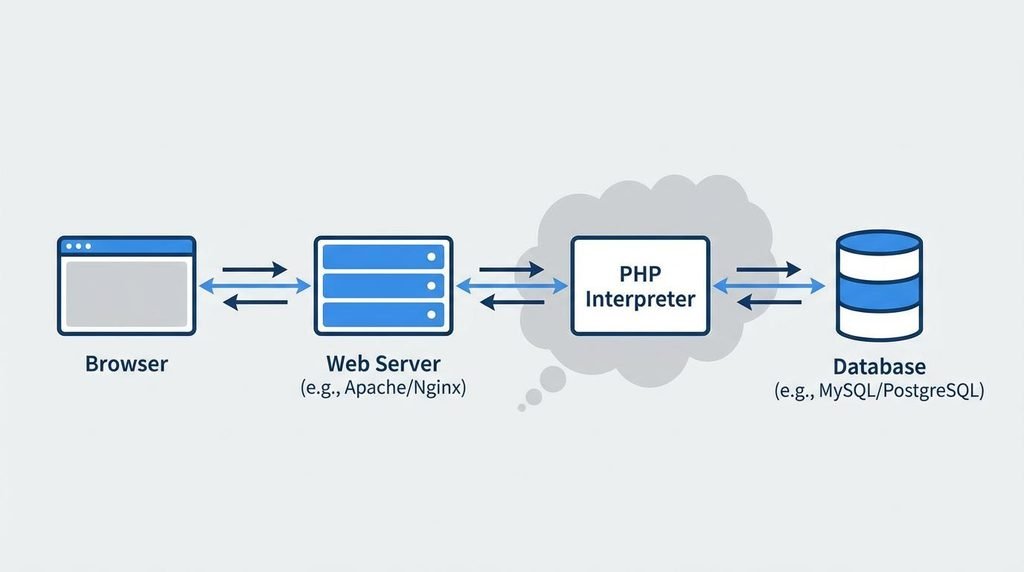
MySQL is a database management system. It allows you to store and organize information.
PHP can communicate with MySQL to save, update, delete, and retrieve data.
Imagine you are building a blog website. You may need to store:
- Blog titles
- Blog content
- Author names
- Categories
- Publishing dates
You can store this information in a database and use PHP to display it on your website.
For example, when you publish a new article through your admin panel, PHP can save the article in your database.
When a visitor opens your blog, PHP can retrieve the published articles and display them.
A common way to connect PHP to MySQL is through PDO or MySQLi. Both support prepared statements, which help protect database queries from SQL injection when used correctly.
What Is the Difference Between PHP and JavaScript?
PHP and JavaScript are both used in web development, but they commonly perform different tasks.
| PHP | JavaScript |
|---|---|
| Usually runs on the server. | Commonly runs in the browser. |
| Processes server-side requests. | Adds interaction to web pages. |
| Can communicate with databases from the server. | Can update a page without reloading it and communicate with APIs. |
| Can generate HTML before sending it to the browser. | Can change the page after it loads. |
| Can manage server-side sessions and application logic. | Can handle browser-side interactions and form feedback. |
For example, PHP can check login details on the server, while JavaScript can show a message if a required form field is empty.
Both languages can work together in the same project.
JavaScript can also run on servers using environments such as Node.js, so it is not limited to browser development.
What Is the Difference Between PHP and HTML?
PHP and HTML have different purposes.
HTML is a markup language used to structure content on a web page. PHP is a programming language used to process information and generate dynamic content.
For example, HTML can display a heading:
<h1>Welcome to My Website</h1>PHP can generate a heading using a variable:
<?php
$title = "Welcome to My Website";

echo "<h1>" . $title . "</h1>";
?>
Both examples can display the same heading in a browser.
The difference is that PHP can generate the heading using information stored in a variable, database, or other source.
What Are the Advantages of PHP?
PHP offers several practical benefits for website development.
- Free to use: PHP is open-source software.
- Beginner-friendly: You can start with basic programming concepts.
- Database support: PHP works with MySQL and other databases.
- Hosting availability: Many web hosting providers support PHP.
- Flexible: You can use PHP for small websites and larger applications.
- Useful for business websites: PHP can handle forms, enquiries, admin panels, and content management.
- Large learning community: Many tutorials and documentation resources are available.
PHP is especially useful when you want to build a database-driven website without starting with a complicated technology stack.
What Are the Limitations of PHP?
Like every programming language, PHP has some limitations and challenges.
- Poorly written PHP code can become difficult to maintain.
- Security problems can occur if user input is not handled correctly.
- Large applications need a clear structure and proper testing.
- Developers must learn database security, authentication, and error handling.
- Performance depends on the code, server setup, database, and overall application design.
These limitations do not mean PHP is unsuitable for modern websites. They show why it is important to learn good coding practices from the beginning.
Is PHP Still Worth Learning?
PHP remains a practical option for people who want to learn backend web development.
It is used in website development, content management systems, and web applications. It also has a large ecosystem of libraries, frameworks, and hosting options.
If you want to create business websites, blogs, admin panels, or database-driven applications, PHP can be a useful skill.
However, the right language for a project depends on its requirements, the existing technology, the available team, and long-term maintenance needs.
For beginners, the most important step is to learn programming fundamentals and practise by building real projects.
What Is the Best Way to Learn PHP as a Beginner?
If you are starting from zero, do not try to learn every PHP topic at once.
Follow this simple learning path.
Week 1: Learn the Basics
Learn PHP syntax, variables, data types, operators, and output.
Week 2: Learn Programming Logic
Practise conditions, loops, arrays, and functions.
Week 3: Learn Forms and Databases
Understand GET, POST, form validation, SQL basics, and database connections.
Week 4: Build a Small Project
Create a contact form, a simple blog, or a basic student record system.
This is a suggested four-week starting plan, not a guarantee that you will master PHP in one month. Your progress will depend on how much time you spend learning and practising.
Beginner PHP Projects You Can Build
The best way to improve your PHP skills is to build small projects.
Here are some ideas you can try after learning the basics.
1. Personal Profile Website
Display your name, skills, education, and experience.
2. Contact Form
Collect a visitor’s name, email, and message.
3. Student Record System
Add, view, edit, and delete student records.
4. Blog Website
Create posts, categories, and an admin panel.
5. Login and Registration System
Practise user registration, password hashing, and sessions.
Start with the contact form or profile website. Once you understand how PHP works, move on to projects that use a database.
Common Mistakes Beginners Should Avoid
When learning PHP, beginners sometimes make mistakes that can be avoided with regular practice.
Mistake 1: Learning without practising
Watching tutorials is helpful, but you should write and run the code yourself.
Mistake 2: Ignoring error messages
Read the error carefully. It may tell you which file and line contain the problem.
Mistake 3: Forgetting semicolons
Most PHP statements end with a semicolon. Forgetting one can cause a syntax error.
Mistake 4: Mixing up PHP and HTML
Remember that PHP runs on the server, while HTML is used to structure the page shown in the browser.
Mistake 5: Ignoring security
Never trust user input. Validate data, use prepared statements for database queries, and escape output appropriately.
Mistake 6: Trying to build a large project too early
Start with small projects. Add more features as your understanding improves.
Frequently Asked Questions About PHP
1. What is PHP in simple words?
PHP is a server-side programming language used to build dynamic websites. It can process forms, work with databases, and generate web page content.
2. Is PHP easy for beginners?
PHP can be a good starting point for beginners. You can learn its basic syntax and programming concepts through small examples and projects.
3. Is PHP free?
Yes. PHP is open-source software and can be used without paying a PHP licence fee.
4. Do I need HTML to learn PHP?
You can learn basic PHP without knowing HTML, but HTML knowledge is very helpful when building websites with PHP.
5. Can I learn PHP without JavaScript?
Yes. You can learn PHP and build server-side applications without JavaScript. However, JavaScript is useful for adding interactive features to websites.
6. Can PHP connect to MySQL?
Yes. PHP can connect to MySQL using tools such as PDO and MySQLi. You can use this connection to store, retrieve, update, and delete information.
7. Can I build a website using only PHP?
You can build the server-side functionality using PHP. For a normal website, you will generally use HTML for structure and CSS for styling. JavaScript is optional for many basic projects.
8. Is PHP used for WordPress?
Yes. WordPress is built primarily with PHP and uses a database to store website content and settings.
9. Can I get a job after learning PHP?
PHP can be useful for web development jobs. Your opportunities will depend on your practical skills, projects, experience, and understanding of related technologies such as databases, HTML, CSS, and JavaScript.
10. How long does it take to learn PHP?
The time required depends on your learning schedule and previous experience. You may learn the basics in a few weeks, but building complete applications and writing secure, maintainable code takes more practice.
Conclusion
PHP is a useful programming language for anyone who wants to learn backend web development.
It allows you to create dynamic websites, process forms, connect to databases, and build features such as login systems, blogs, and admin panels.
If you are a beginner, start with the basics. Learn variables, conditions, loops, and functions. Then practise working with HTML forms and databases.
You do not need to understand everything on your first day. Write small programs, solve simple problems, and keep building projects.
With regular practice, you can use PHP to create your own websites and web applications.
Start learning PHP today, and take your first step towards becoming a web developer.